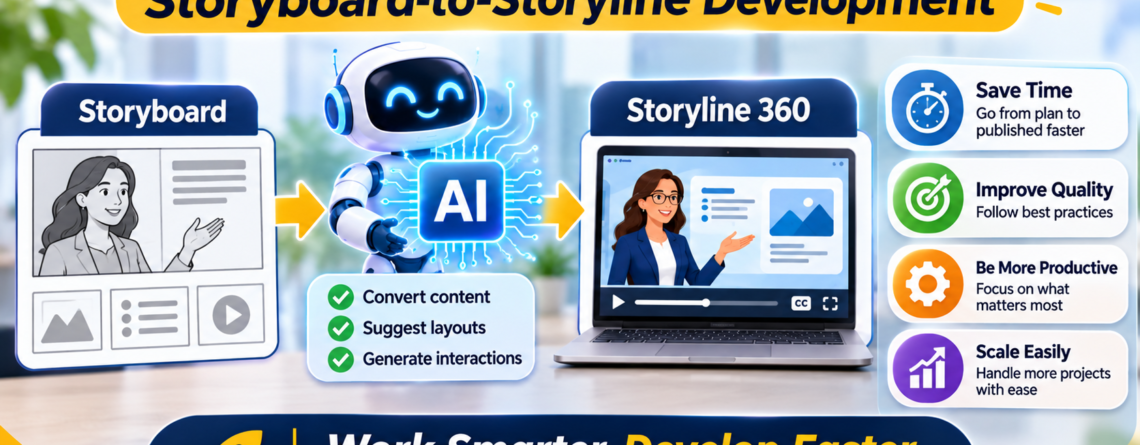
The stretch between an approved storyboard and a finished Storyline course is where a lot of a project’s hours quietly disappear. The thinking is mostly done. The content is signed off. And yet the build still takes days, because turning a storyboard into a working course is a grind of writing, formatting, producing media, and assembling it all screen by screen.
This middle stretch is exactly where AI can save you real time. Not by making the design decisions, which should already be settled in the storyboard, but by accelerating the production work that comes after. I have folded AI into this part of my own workflow, and it has genuinely shortened the build without lowering the quality. Here is how I use it.
A quick caveat first. The tools shift quickly, so treat these as current practices rather than fixed rules, and keep a human check on everything AI touches.
Start With a Locked Storyboard
Before any of this works, one thing has to be true. The storyboard needs to be genuinely approved and stable. AI speeds up production, and production should only start when the thinking is done.
If you try to use AI to race ahead while the design is still in flux, you just generate a lot of content you will throw away. The speed gain turns into speed waste. So the first principle is not about AI at all. It is discipline about the storyboard. Lock the design, then let AI accelerate the build. In the right order, the time savings are real. In the wrong order, they evaporate.
Where AI Accelerates the Build
Once the storyboard is locked, here is where AI earns its place in the move to Storyline:
- Polishing on-screen text and narration. Your storyboard has the content, but it often needs tightening for the screen and the ear. AI is a fast first editor, turning rough storyboard text into clean, learner-ready copy.
- Expanding notes into full narration scripts. Where a storyboard has shorthand, AI can draft it out into a full script for you to refine, which is quicker than writing each line cold.
- Drafting assessment questions. If the storyboard specifies a knowledge check, AI can generate question options to sharpen rather than writing them from scratch.
- Placeholder media. Draft visuals and synthetic voiceover let you assemble and test the course quickly, even before final assets are ready.
- Alt text drafts. AI can propose alt text for your images, giving you a starting point to refine for accessibility instead of writing each one blank.
Notice that all of these are production tasks that sit downstream of the design. AI is filling in and speeding up, not deciding. That is the sweet spot.
Where You Still Build by Hand
Just as important is knowing what AI does not touch in this stretch. The actual Storyline development is still yours.
- Building interactions. Triggers, variables, states, and layers are the machinery of the course. Setting them up correctly and reliably is hands-on development work.
- Layout and visual assembly. Placing elements, timing animations to narration, and making each slide read cleanly is craft, not generation.
- Technical setup. SCORM or xAPI output, tracking that reports correctly, and responsive behavior across devices.
- Accessibility done right. Focus order, keyboard navigation, and verifying the alt text actually makes sense in context.
AI hands you better raw material, faster. You still assemble it into a working course. The build itself stays a human job, and that is what keeps the quality intact while the speed goes up.
A Realistic Workflow
Here is roughly how this looks in practice, start to finish:
- Lock the storyboard. Design decisions settled and approved.
- Run the content through AI. Polish the on-screen text, expand the narration, draft the questions and alt text. You now have clean, build-ready material in a fraction of the usual time.
- Generate placeholder media. Draft visuals and voiceover so you can build and test immediately, swapping in final assets later.
- Build in Storyline by hand. Interactions, layout, timing, technical setup, accessibility. This is where your skill does the work.
- Quality-check everything. And this includes checking the AI’s output, not just the build. Verify facts, read the narration for tone, confirm the questions test the right thing.
The AI steps compress the production time dramatically. The human steps keep the course good. Together they give you a faster path without the usual tradeoff.
Speed Where It Is Safe, Care Where It Counts
The reason this works is that it puts AI exactly where it belongs. The storyboard-to-Storyline stretch is mostly production, and production is where AI is strongest. By the time you reach it, the hard thinking is already done and captured in the storyboard, so there is less risk in letting AI move quickly through the content.
But do not let the speed tempt you into skipping the human parts. The build still needs a developer, and the AI output still needs checking. One confident error in a generated script, or one broken trigger in a rushed build, erases the time you saved and then some. Fast is only valuable when the result still works.
So use AI to tear through the production grind in the middle of your projects, and keep your hands firmly on the design before it and the build after it. That combination is how you ship good courses faster, which in a field of tight deadlines is worth a great deal.
If you want a partner who uses AI to move quickly through production while personally building and checking the course that gets delivered, that is exactly how I work. You can always reach out for help with your next custom eLearning project.